
Choosing A Web Server
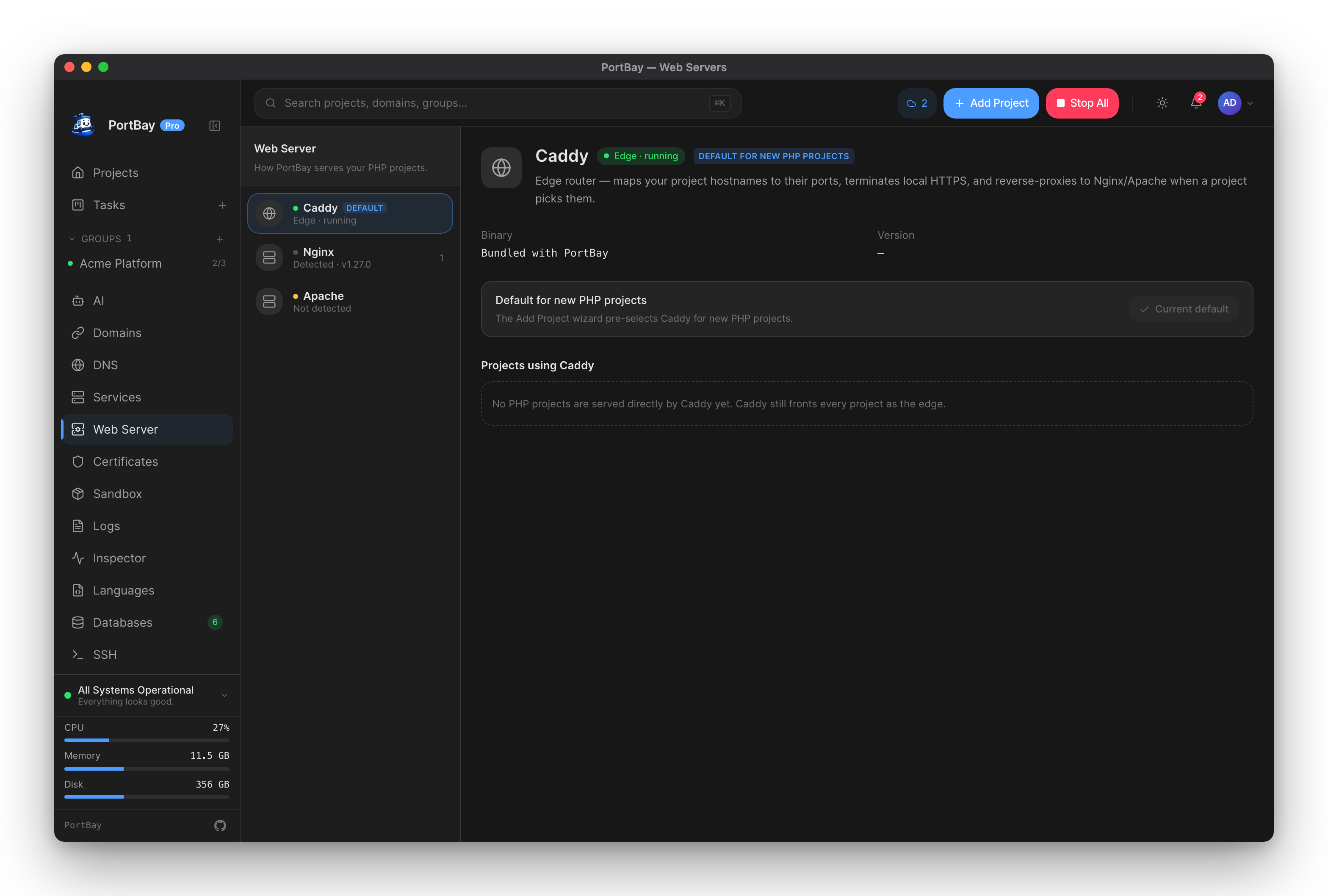
Each project is served by Caddy, Nginx or Apache. Caddy is the default.
Whichever you pick, Caddy stays the edge: it answers https://<name>.test, terminates TLS with the project's trusted local certificate, and routes the hostname. When a project uses Nginx or Apache, PortBay runs that server privately on 127.0.0.1 and Caddy forwards the project's traffic to it. Certificates, .test DNS, sharing and tunnels work the same for all three.
flowchart LR
  browser["https://blog.test"] --> caddy["Caddy edge (TLS, hostname routing)"]
  caddy -->|Caddy| app["PHP-FPM, files or dev server"]
  caddy -->|Nginx or Apache| engine["Nginx / Apache on 127.0.0.1"]
  engine --> app2["PHP-FPM, files or dev server"]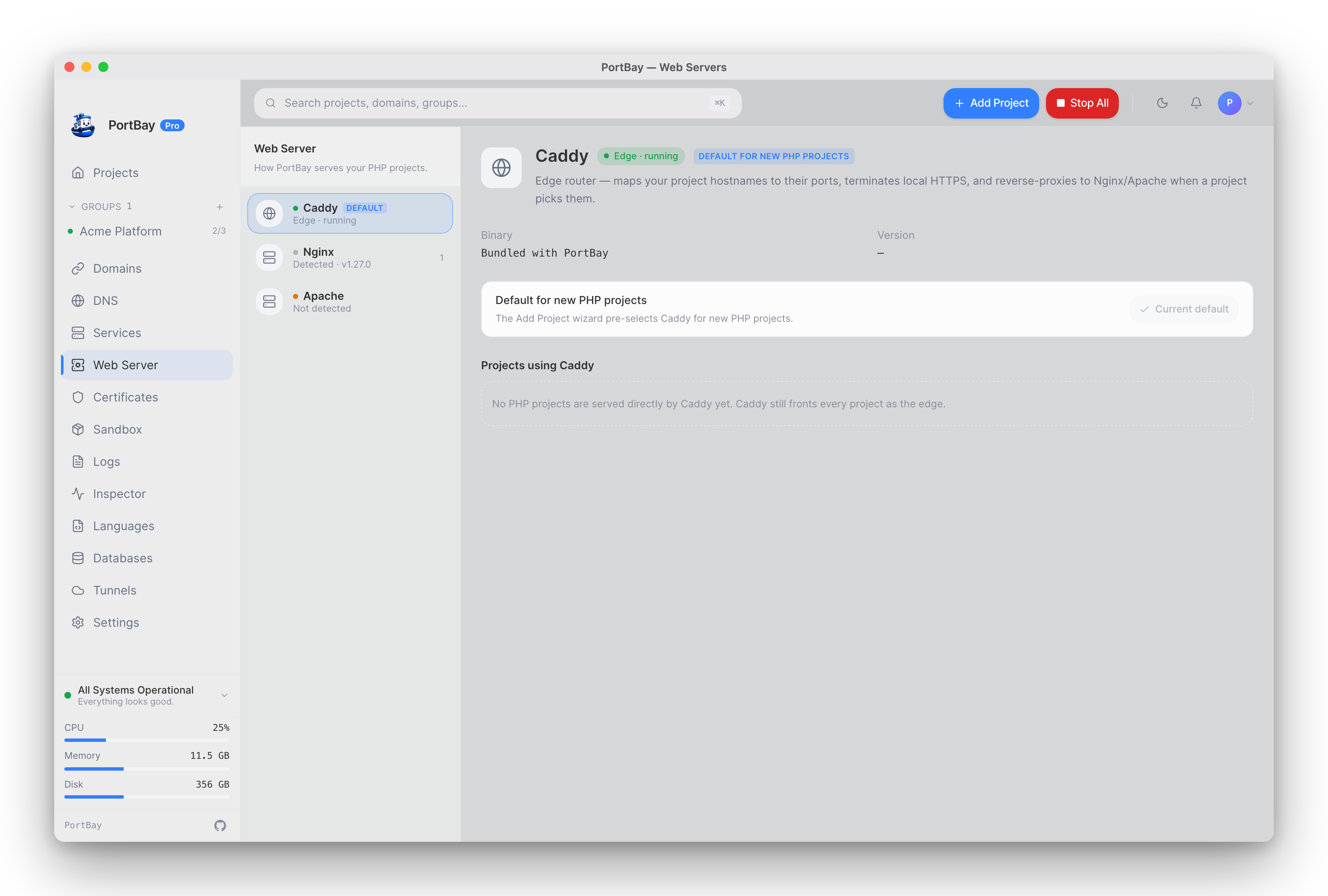
Extra Hostnames
A project can answer on more than one hostname. Aliases you add on the Domains page are routed, certified and resolved like the primary hostname, and they reach the same web server as the project's own name, so an alias of an Nginx project is served by that project's Nginx. See Hostname aliases for the naming rules.
HTTP/3
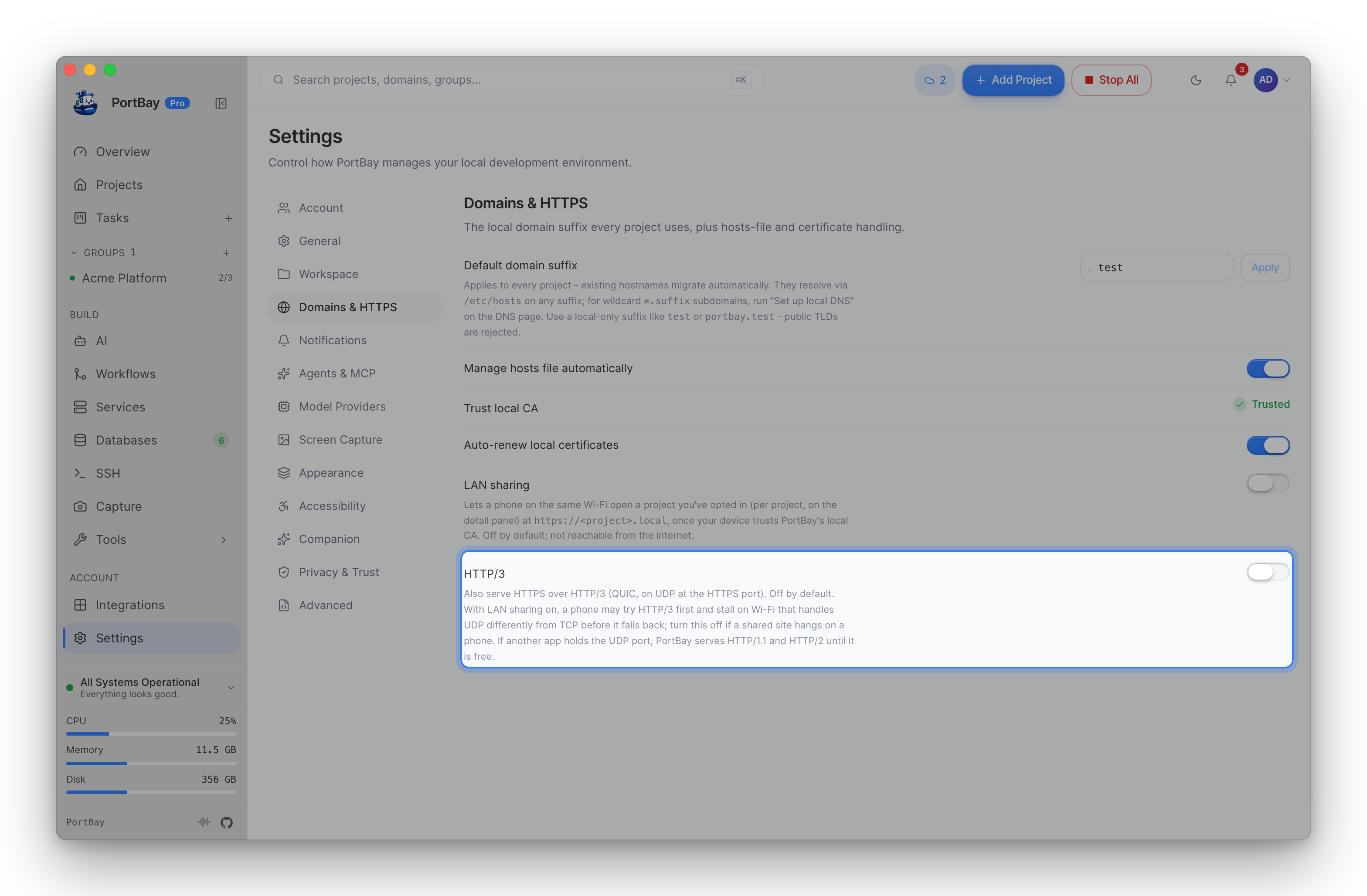
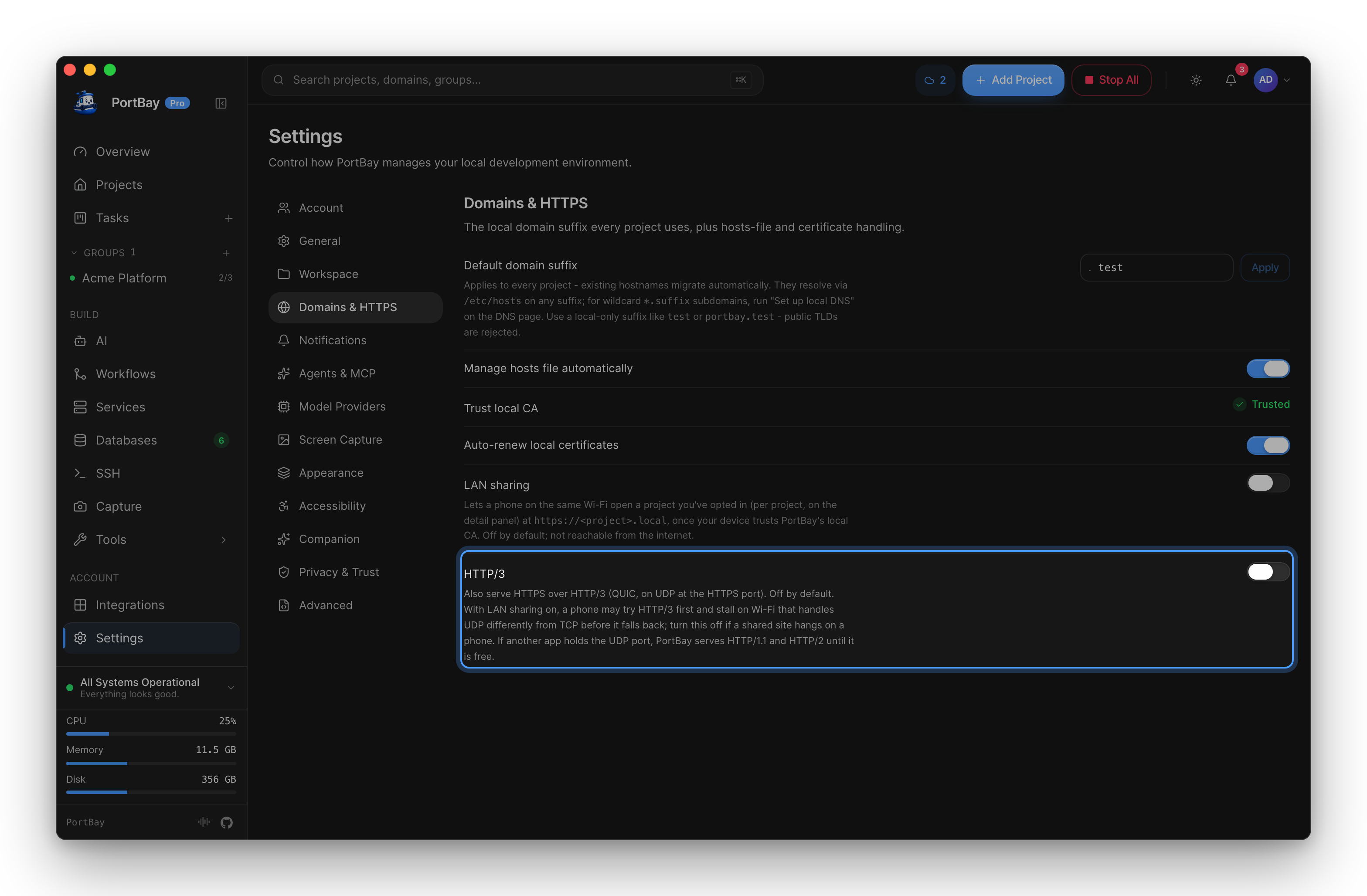
Caddy serves HTTPS over HTTP/1.1 and HTTP/2 by default. HTTP/3 (QUIC, which runs over UDP) is off until you turn it on in Settings → Domains & HTTPS → HTTP/3.
- Where it applies: the setting is global and affects only Caddy's HTTPS edge. Nginx and Apache, and dev servers, sit behind the edge and are unchanged. The plain HTTP listener is unchanged too.
- UDP port: with HTTP/3 on, Caddy also listens on UDP at the same port number as HTTPS. If another process already holds that UDP port, PortBay leaves HTTP/3 off, serves HTTP/1.1 and HTTP/2 as before, and the reconcile message names the process holding the port. HTTPS over TCP is not affected.
- Why it is off by default: when HTTP/3 is advertised, a phone on Wi-Fi that treats UDP differently from TCP can stall before it falls back to the TCP connection that works. This shows up mostly with LAN sharing. If a shared site hangs on a phone, turn HTTP/3 off.
Which Projects Can Choose
| Project | What Nginx or Apache does |
|---|---|
| PHP site with no dev command | Serves the document root and hands .php to PHP-FPM. |
| Static site | Serves the files. .php files are refused, never run and never sent as source. |
| Dev server (Node, Next, Vite, Python and the rest) or a project proxied to an upstream | Sits between Caddy and the dev server as a reverse proxy. The dev server keeps its own port and command. HTTP, WebSockets (including HMR) and event streams pass through. |
| Native app launch (Xcode, Android, Flutter, Expo) | Not available. These publish no web origin to put a server in front of. |
A project proxied to an https:// upstream can't use Nginx or Apache: Caddy reaches that upstream itself and verifies its certificate.
Picking A Server
- When you add a project: the Add Project wizard has a Web server select.
- Later: open the project and change Web server in its Configuration card.
- Default for new projects: on the Web Servers page, choose a server and click Set as default. The wizard pre-selects it for new PHP and static projects. Existing projects keep their setting, and dev-server projects start on Caddy until you pick another server for them.
- From the CLI:
portbay add <path> --web-server nginx(see the CLI reference). - In a committed
.portbay.json:"webServer": "nginx"or"apache".
Getting Nginx Or Apache
PortBay uses an Nginx or Apache already on your Mac:
| Server | Where PortBay looks |
|---|---|
| Nginx | Homebrew (brew install nginx), then nginx on your PATH. |
| Apache | Homebrew (brew install httpd), then the Apache macOS includes at /usr/sbin/httpd, then httpd on your PATH. |
Binaries inside another local-dev app (ServBay, MAMP, XAMPP, Herd) are not used. The Web Servers page shows the binary and version each server resolves to, and which projects use it.
Switching And Rollback
Before a switch is saved, PortBay renders the project's config for the new server and runs the server's own check on it (nginx -t or httpd -t). If the check fails, or the server isn't installed, the switch is refused with the reason and nothing is saved.
If the project is running, PortBay then starts it on the new server and waits up to 15 seconds for it to answer. If it doesn't, the previous server is restored and you see why. A stopped project switches without starting.
Custom Directives
Under the web-server select, Edit server config opens the project's own directives for the server it uses. Each server keeps its own file, and switching away and back finds your directives where you left them.
- Nginx: directives for inside the
serverblock, included after PortBay's. - Apache: directives for the server context, included after PortBay's. The file starts with the
LoadModuleline formod_headerscommented out, for when you needHeader. - Caddy: Caddyfile syntax, as inside a site block. They run for this project's hostnames only, before PortBay's own handler. Anything that reaches past the project is refused: a second site block, a site-level
tls, a globalloggingblock,bind,log,handle_errors,hostmatchers, and routes that send requests back to PortBay's own Caddy.
Saving checks the new text with the server itself first. A refusal shows the server's message with its line number, and the directives already saved keep serving. The generated config is shown read-only below the editor.
Rewrites And .htaccess
A PHP site with no dev command can pick a preset under Rewrites in its Configuration card:
| Preset | Behaviour |
|---|---|
| Default | Real files and directories are served as themselves; other paths go to router.php, or index.php when there is no router.php. |
| WordPress | Pretty permalinks and every other miss go to /index.php. |
| Laravel | Serves public/ when no document root is set; misses go to its index.php. |
The preset works the same on all three servers. Apache also reads the project's own .htaccess files, and their rewrites run before PortBay's front-controller fallback. Nginx and Caddy do not read .htaccess.
Files That Are Never Served
On every server, requests for these answer 403: .htaccess and other .ht* files, .git, .svn and .hg, .env and .env.*, SSH keys (id_rsa*, id_ed25519*), *.pem and *.key, .npmrc, .netrc, editor and agent config (.vscode, .idea, .mcp.json, .claude, .cursor, .codex, .gemini, .aider*), PortBay's own .portbay* state and .DS_Store. A document root is often the project root, and a shared or tunnelled site serves it to other people.
Environment Variables On PHP Sites
A PHP site served from its document root has no process of its own, so its environment variables reach PHP as FastCGI parameters on each request, on all three servers. Values that look like secrets and vault references are not passed, because the generated configs live on disk. The Environment editor lists every skipped key with the reason. Use portbay exec when a command needs the secrets.
Logs And Generated Files
The log viewer has Output, Access log and Error log tabs, labelled with the server that serves the project.
| Nginx / Apache | Caddy | |
|---|---|---|
| Access log | The project's own file | Caddy's shared access log, filtered to the project's hostnames |
| Error log | The project's own file | The project's 5xx responses (Caddy keeps no per-site error log) |
Files on disk:
~/Library/Application Support/PortBay/webservers/<nginx|apache>/<project-id>/   generated config + custom.conf
~/Library/Application Support/PortBay/logs/webservers/<project-id>/ <server>-access.log, <server>-error.logEvery request still passes through Caddy, so the HTTP Inspector shows traffic for projects on any server.
Known Differences Between Servers
The servers run the same PortBay-generated rules and are checked against the same requests. These differences are expected:
| Request | Nginx | Apache | Caddy |
|---|---|---|---|
| Directory with no index file | 403 | 404 | 404 |
/dir redirect to /dir/ | 301, relative Location | 301, absolute Location | 308, relative Location |
.js content type | application/javascript or text/javascript, from Nginx's own mime.types | text/javascript | text/javascript |
Rewrites in .htaccess | Ignored | Applied | Ignored |
On an Apache older than 2.4.26, only HTTPS=on is passed to PHP for a request that arrived over HTTPS; REQUEST_SCHEME and SERVER_PORT are not corrected.
Troubleshooting
| Symptom | Cause | Fix |
|---|---|---|
| Switch refused: "Nginx isn't installed on this Mac" | No usable binary found | brew install nginx or brew install httpd, then switch again. |
| Switch refused with a config error | The server's own check failed, often on your custom directives | Fix the line the message names in Edit server config. |
| Switch rolled back | The new server did not answer within 15 seconds | Check the project's Error log tab, fix, and switch again. |
| Project shows a web-server warning and PortBay's placeholder page | The server could not be set up for this project (no port, no PHP version, missing binary) | The warning names what is missing. Fix it, or switch the project to Caddy. |
| 403 on a directory under Nginx | Nginx answers 403 for a directory without an index file | Add an index file, or request a file inside it. |