
Image Generation
Generate images from a text prompt without a cloud account, an API key, or a single byte leaving your machine. PortBay gives you two on-device engines on the same screen: a diffusion model you download and run through the bundled portbay-imagegen sidecar (Core ML on the Neural Engine / GPU), and Apple Image Playground, the system generator from Apple Intelligence. Pick one in a dropdown, type a prompt, and the result lands in a session gallery you can save as PNG.
Everything runs on your Mac: the prompt, the model, and the pixels.
Quickstart
Open AI in the sidebar (
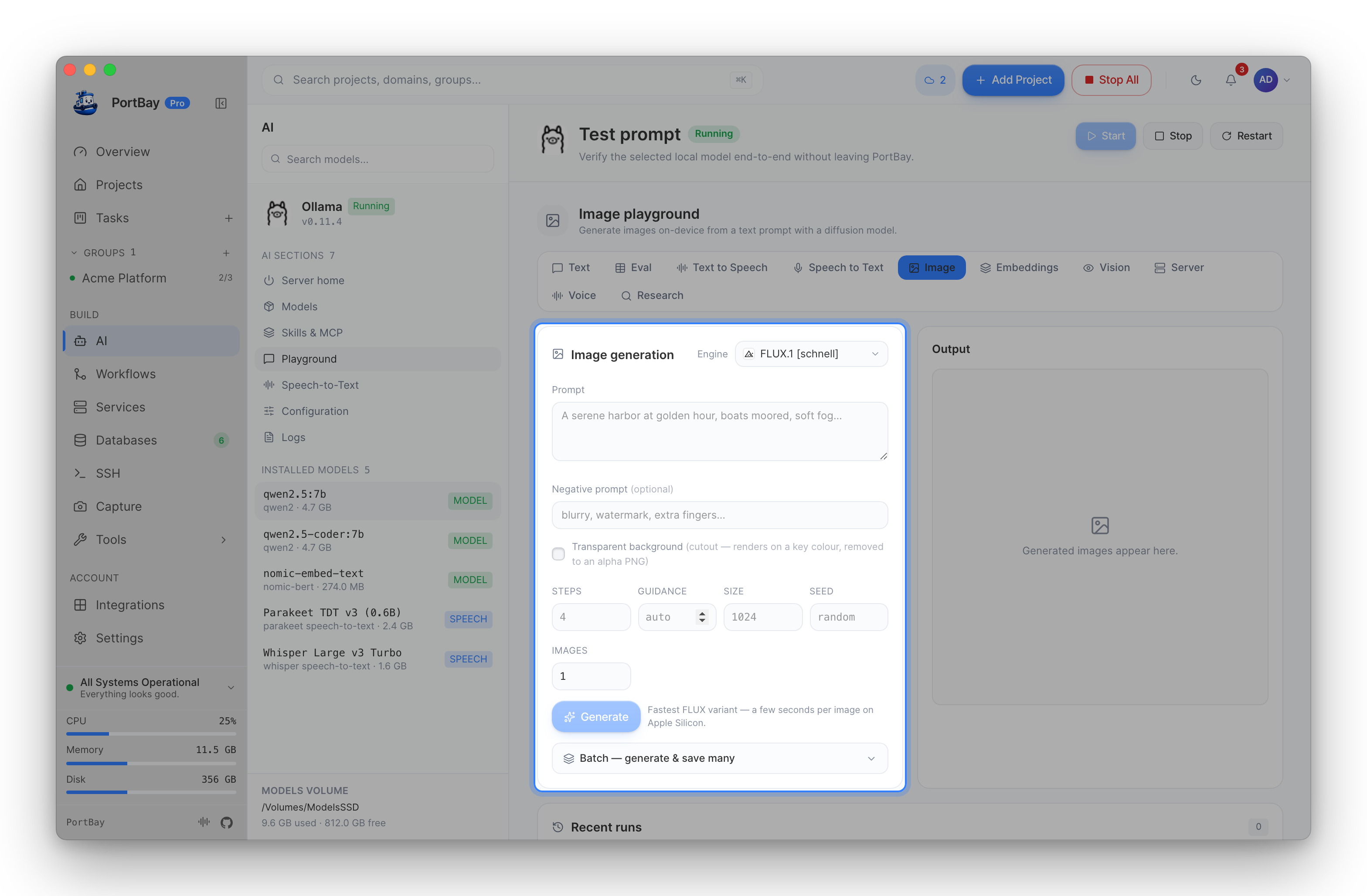
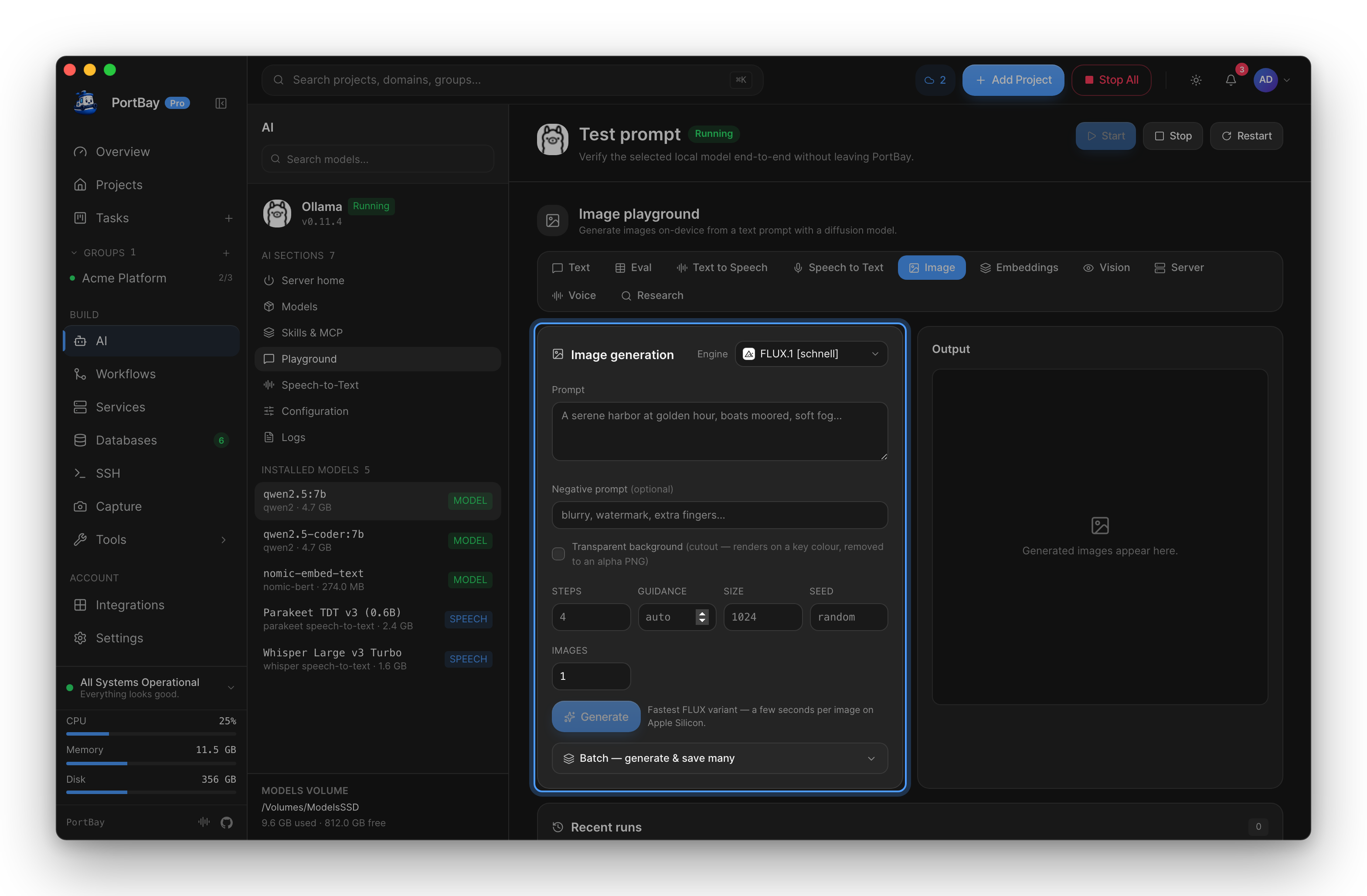
/ai) and go to the Playground → Image tab (or jump straight there with/ai?playground=image).Pick an engine from the Engine dropdown:
- Apple Image Playground — no download; needs Apple Intelligence (see requirements).
- A diffusion model — the first time, click Download to fetch it into PortBay's models folder.
Type a Prompt and click Generate.
The image appears under Output. Click Download PNG to keep it; recent results stay in the session gallery.
The two engines
| Engine | Runs on | Download | Needs |
|---|---|---|---|
Diffusion model (portbay-imagegen) | This Mac — Core ML on the Neural Engine / GPU | One per model, from the catalog | macOS 14+ |
| Apple Image Playground | This Mac — system ImageCreator (Apple Intelligence) | None (system-provided) | macOS 15.4+, Apple Intelligence, supported hardware, PortBay frontmost |
Both keep the prompt and the result inside PortBay. The difference is control vs. convenience: the diffusion path exposes steps, guidance, size, and seed; Apple Image Playground takes a prompt and returns a styled image with no knobs.
Diffusion model
Download a model once (the Image tab offers it, or the Models → Image generation family does), then generate with full control:
| Control | What it does |
|---|---|
| Prompt | What to generate. Required. |
| Negative prompt | What to steer away from (e.g. blurry, watermark, extra fingers). Optional. |
| Steps | Denoising steps. More steps, more detail, slower. Defaults to the model's own value. |
| Guidance | How strictly the image follows the prompt. Leave blank for the model's default. |
| Size | Output edge in pixels (default 1024). |
| Seed | Fix it to reproduce a result; leave blank for a random one each run. |
Generation streams progress step by step (Diffusing… step 12/30), and Cancel stops the run and frees the sidecar. Each result is added to a session gallery (the most recent twelve) — click a thumbnail to bring it back, or Download PNG to save it. The gallery is per-session and not persisted; this is a test surface, not an asset manager.
Apple Image Playground
Selecting Apple Image Playground swaps the controls for a single prompt box — the system generator handles the rest, on-device, via Apple Intelligence. There's no model to download from PortBay, but macOS fetches Apple's image model itself the first time:
- If macOS hasn't downloaded the model yet, PortBay shows Open Image Playground — launch Apple's app once to start the system download, then come back and Try again.
ImageCreatorrefuses to run for a background app, so PortBay must be the frontmost window when you generate. If it isn't, PortBay tells you to click back into it and retry.
Where models live
Image models share the AI-models root with Ollama and speech models — set AI → Configuration → Models directory once (an external SSD is a common choice) and all three live side by side. Downloads show a progress bar; a download started in the Models tab and one started from the Image playground talk to the same sidecar, so PortBay blocks a second concurrent pull rather than corrupting the first.
Reference
Requirements
| Engine | Needs |
|---|---|
| Diffusion model | macOS 14+, one downloaded image model, the bundled portbay-imagegen sidecar. |
| Apple Image Playground | macOS 15.4+, Apple Intelligence enabled, supported Apple Silicon, PortBay frontmost. Apple's image model downloaded via the system Image Playground app. |
Image generation is macOS-only. On an unsupported build or OS, the panel says which requirement is missing rather than failing silently.
Output
- Results render in the Output panel and accumulate in a session gallery (newest first, up to 12).
- Download PNG saves the current image. Nothing is written to disk until you do.
Troubleshooting
| Symptom | Likely cause | Next action |
|---|---|---|
| Image tab says generation isn't available | macOS older than 14, or the portbay-imagegen sidecar is missing | The panel names the reason. Reinstalling PortBay restores the sidecar; the diffusion path needs macOS 14+. |
| Apple Image Playground says the model isn't downloaded | macOS hasn't fetched Apple's image model yet | Click Open Image Playground, let the system download finish, then Try again. |
| "needs PortBay to be the active app" | ImageCreator refuses background callers | Click into the PortBay window to make it frontmost, then generate again. |
| Generation is slow | High step count or a large model on modest hardware | Lower Steps, reduce Size, or pick a lighter model. The speed note next to Generate is the model's own hint. |
| Download won't start | Another image-model pull is already running | Finish or cancel the pull in the Models tab first — both surfaces share one sidecar. |
Related
- Local AI (Ollama) — the managed text-model server on the same AI page.
- Speech-to-Text and Text-to-Speech — the other on-device AI surfaces.