
Task Board & AI Agents
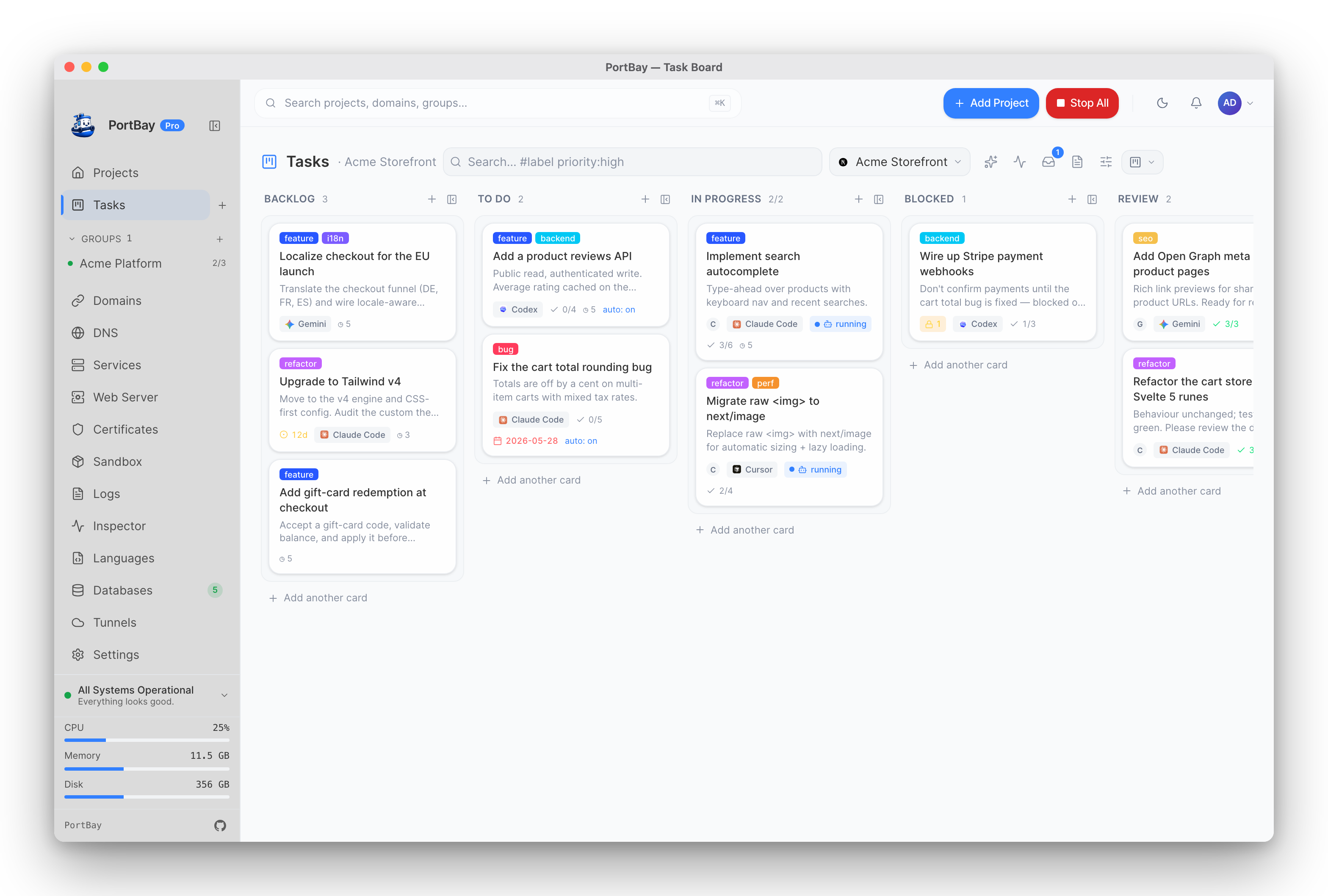
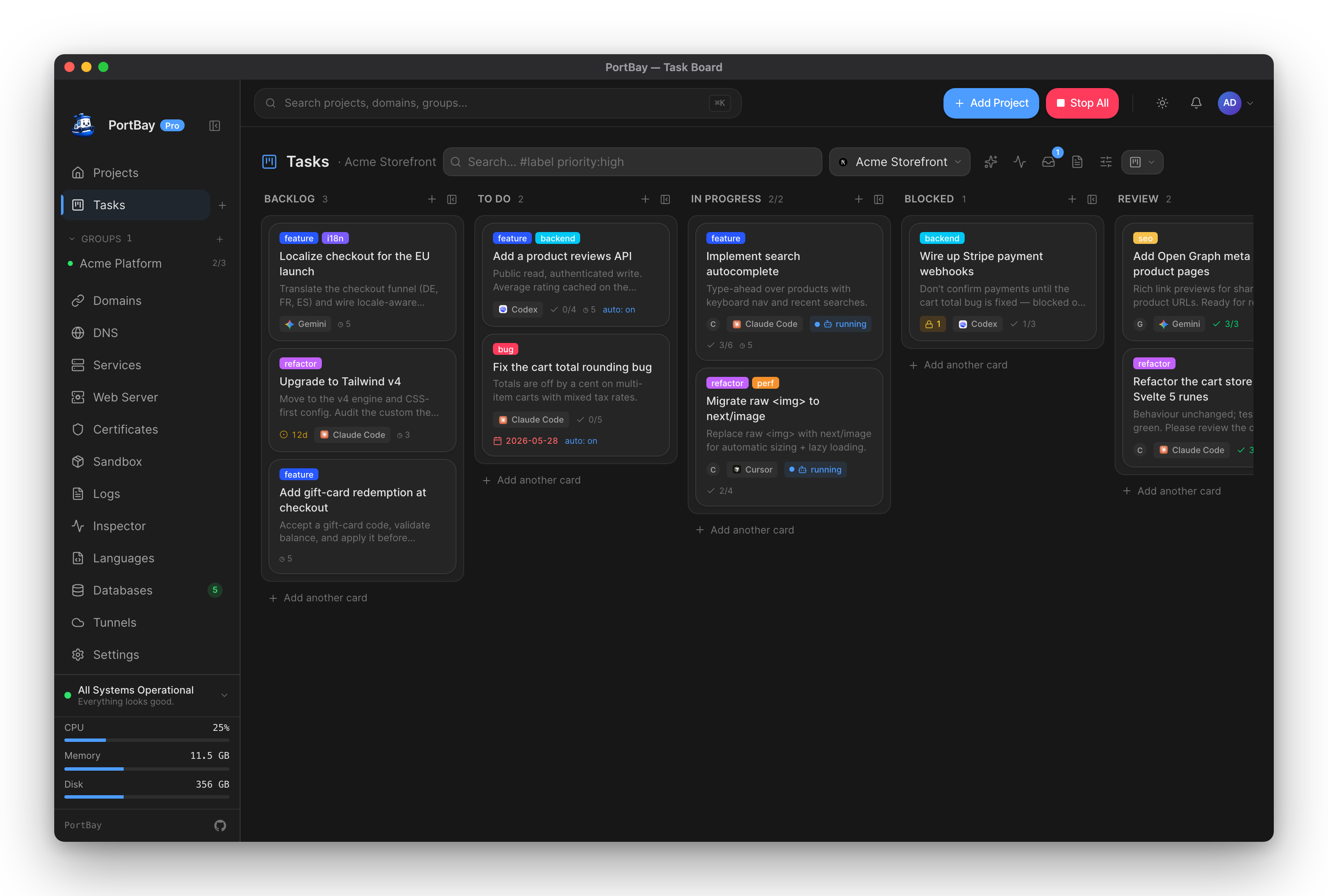
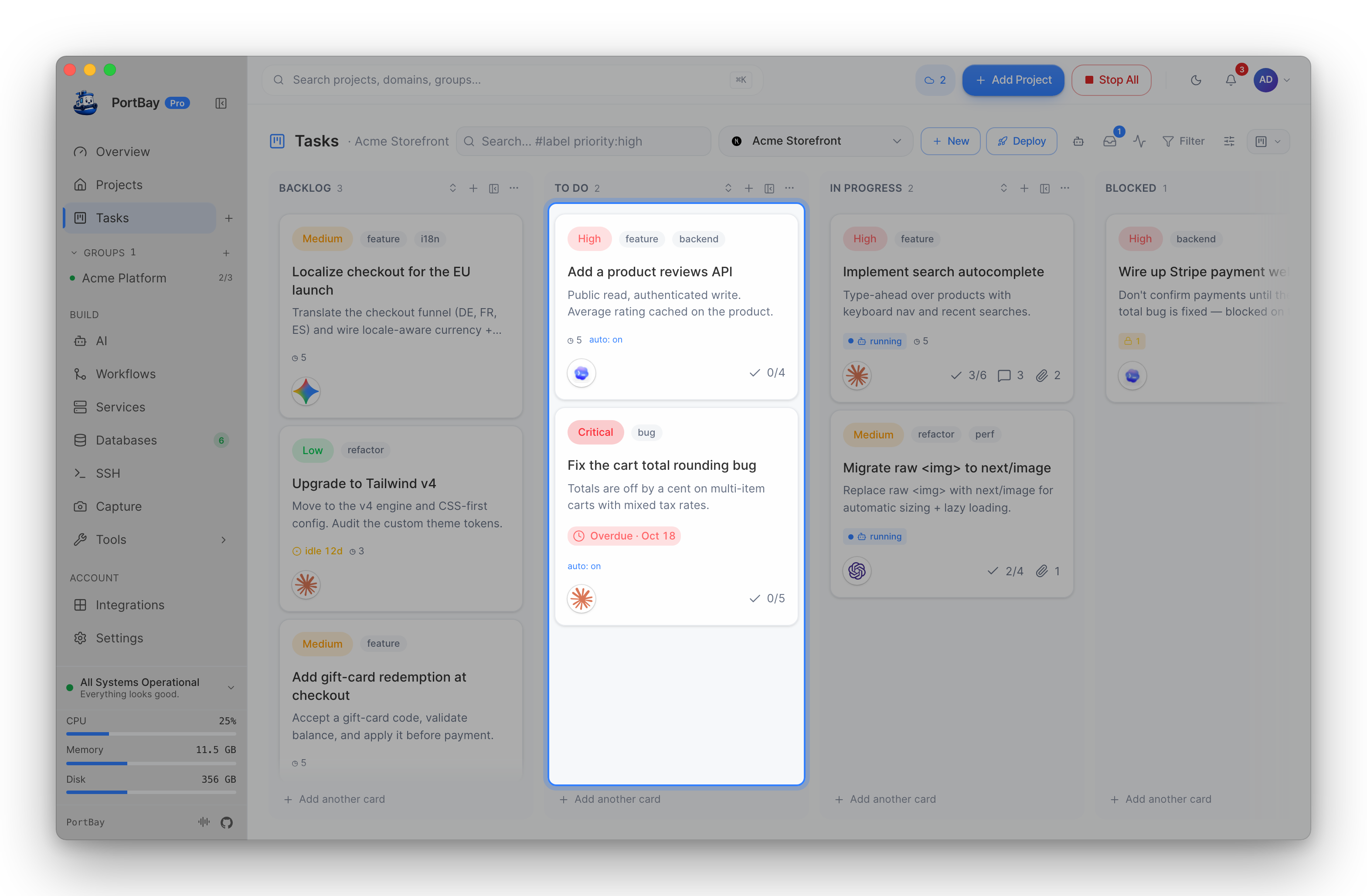
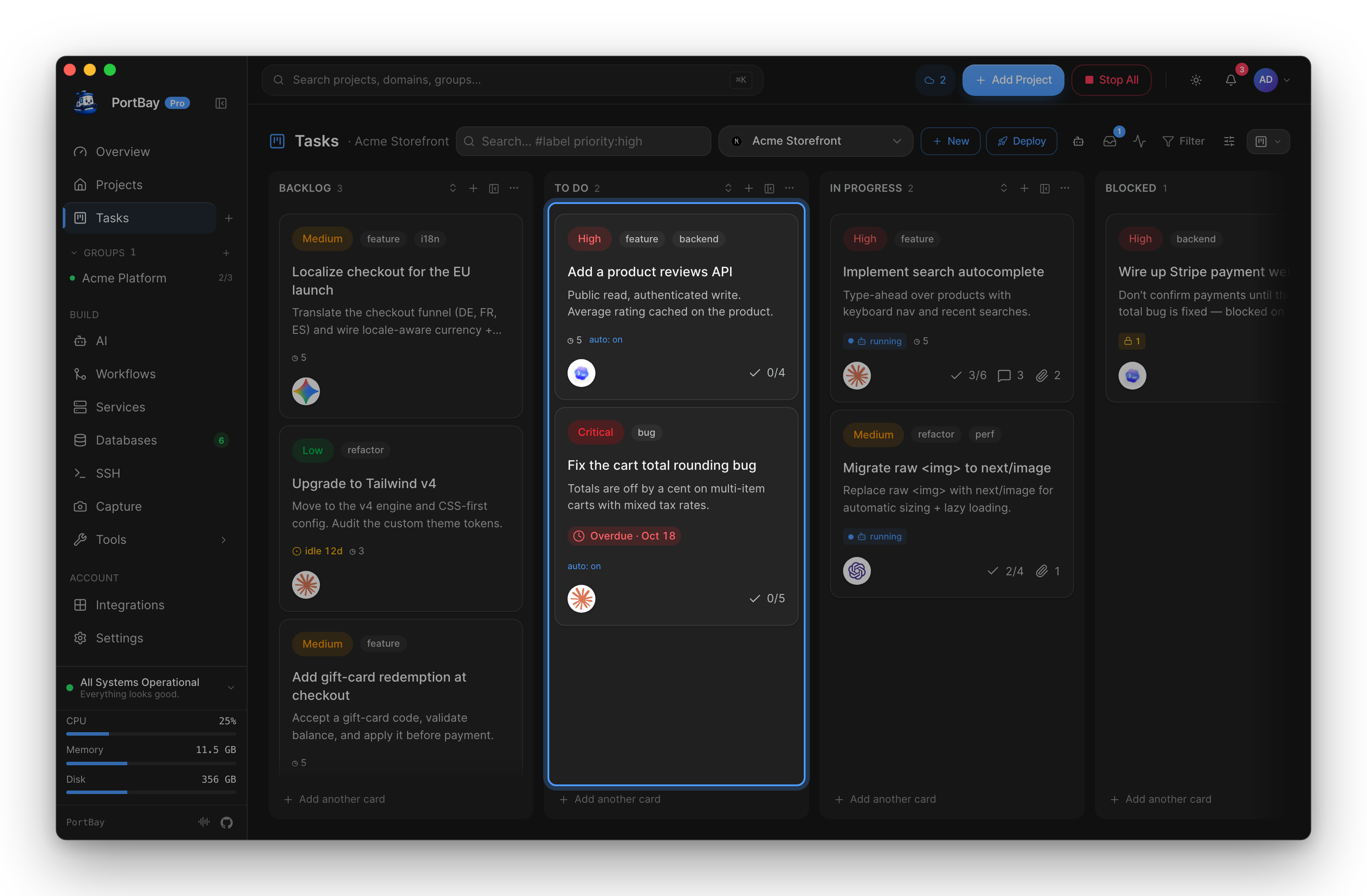
Every project in PortBay gets a board. It looks like any Kanban board — columns of cards you drag between states — with one difference: move a card to To Do and the AI coding agent you assigned picks it up and starts working. The agent runs in your project, on your machine; when it finishes it writes a hand-off note so the next run (agent or human) can continue without re-deriving context.
Cards are Markdown in your repo
A board isn't a database hidden inside the app. Each card is a Markdown file under .portbay/tasks/ in the project, and the rolling hand-off log is .portbay/HANDOFF.md. That means:
- Cards version with your code — they show up in
git diff, travel in branches, and survive without PortBay. - The board is editable three ways that never drift apart: the GUI, the
portbayCLI, and the MCP server all read and write the same files. - You can read a card in any editor. PortBay just gives it a board, a runner, and the agent plumbing.
The columns
| Column | Meaning |
|---|---|
| Backlog | Captured, not yet ready to start. |
| To Do | Ready to work. Moving a card here is what dispatches its agent. |
| In Progress | An agent (or you) is actively working the card. |
| Blocked | Waiting on another card or an external answer. Optional column, shown on demand. |
| Review | Agent-reported "done", held for a human to approve. Optional column. |
| Done | Finished and accepted. |
| Rejected | Won't do. Human-only — an agent can never move a card here. |
Assign an agent
PortBay does not ship a model of its own. It launches the coding agent you already have installed and points it at the card. Recognised out of the box:
Claude Code · Codex · Cursor · Gemini · Aider · Copilot · OpenCode · Amp · Qwen · Antigravity · Ollama — and a Custom option that runs any other CLI from a command template.
When you choose Ollama for a local model, PortBay does not use a silent chat loop. It runs the card on its own native in-process runtime with the model selected on the card, so local LMs get the same agentic read/edit/run workflow as the external coding CLIs. (This used to launch a bundled portbay-agent engine in a terminal; that engine has been retired and nothing ships it — the runtime is built in.)
Most agents launch as a CLI subprocess; a few (e.g. Cursor) open as a desktop app on the project folder. PortBay auto-detects which agents are installed and lets you set the binary path manually for anything it can't find. You can:
- Assign an agent per card — different cards can go to different agents.
- Set a board default — every card without its own agent uses it.
Set both in the board's settings and in Settings → Integrations, which also detects your installed agents and writes the MCP config for each client (see Drive PortBay from an AI Agent).
Auto-dispatch vs. confirm
A board runs in one of two modes:
- Auto-dispatch on To Do — the moment a card lands in To Do, its agent is launched. Good for boards you want to run themselves.
- Manual — moving a card to To Do queues it, and PortBay asks you to confirm before the agent starts. Good when you want a human in the loop on every run.
A board can also cap how many agents run at once (concurrency), so a busy board doesn't launch ten agents simultaneously.
The hand-off note
When a run ends, the agent appends a short entry to .portbay/HANDOFF.md:
- Newest first — each entry is prepended with a
## <timestamp> · <author>heading. - Size-capped — the log is bounded; once it hits the cap, the oldest entries are pruned, so the brief stays short.
- Attributed — every entry is signed by the agent, the CLI, you, or PortBay.
- Pointers, not payloads — it records what changed, the next concrete step, and open items; it points at cards and files rather than pasting them.
The next run reads the hand-off first, so work continues from "where we left off" instead of from a cold start. This is what lets one agent pick up where another (or you) stopped.
It stays out of trouble
The board is designed to fail safe when an agent gets something wrong:
- Dependencies. A card can be blocked on other cards; it won't dispatch until they reach a terminal column.
- Review gate. Turn on Require review and agent-reported "done" lands in Review for a human to approve — it never jumps straight to Done.
- Crash recovery. A running card holds a lease with a heartbeat. If the agent's process dies, the lease expires and the card is reclaimed back to the queue instead of getting stuck "in progress".
- Rejected is human-only. Agents can advance cards to In Progress, Blocked, Review, or Done — but only a person can reject one.
- Optional auto-branch. A card can create or switch to its own git branch on dispatch, so parallel agents don't fight over the working tree.
Finishing a card that no command can check
Most of what is above assumes the board belongs to a developer: an agent works the card in a repo, a verifyChecks command proves it, a commit lands. That is one kind of board. A student tracking coursework, an owner chasing invoices and an office admin running an onboarding list have no repo, no toolchain and no commit — and a card whose acceptance is "the client paid" has no shell command either.
For those cards, doneWhen replaces the shell checklist. It is an ordered set of completion signals, each checkable with no toolchain, no repository and no network:
| Signal | Met when | Evidence |
|---|---|---|
checklist | Every item on the card's own checklist is ticked (and there is at least one). | A person ticked them. |
signOff | A person recorded signedOff: {by, at, note?} on the card. | Their name and the time. |
{path: …} | That file or folder exists under the project and is not empty. | The filesystem. |
doneWhen:
  - checklist
  - path: reports/q3-summary.pdf
    minBytes: 1024        # optional floor; default 1
signedOff:
  by: Priya
  at: 2026-08-20T14:02:00Z
note: paid by transfer, ref 44192Signals report exactly like any other gate: each lands in the same pass/fail checklist, the same activity comment and the same evidence packet, under its own name.
This does not make Done cheaper, which is the whole design constraint:
- Every declared signal must be met — the list is an AND, and it is ANDed with
verifyCheckstoo. Adding a signal can only make a card harder to finish, never easier. A card that declares none behaves exactly as before. - A signal that cannot fail is not a signal. An empty checklist, a zero-byte file and a sign-off with nobody's name on it are refusals, not passes. A sign-off dated before the run that claimed the card is refused too — it was given about something else.
signedOffis a human's sentence. An agent must never write it on its own behalf; it is often the only evidence the card has.- There is no board-wide
doneWhen. It is per-card only, so nobody can flip one switch and make every card on the board finish on a tick.
A card whose signals are not met is not waved through — it lands in Blocked naming the signal that is missing and what would satisfy it, and it leaves the moment that thing happens and Done is reported again.
No repository? The board still works
Cards are Markdown files in .portbay/tasks/, and reading, writing, moving, commenting and checklists never touch git. On a folder git has never seen, the board runs — you simply do not get the parts that are made of git: the canonical refs/portbay/board store shared across worktrees, per-card branches and worktree isolation, the working-copy diff, auto-commit on Done, and the commit-trailer reconciler. Those go quiet rather than failing.
When a card keeps failing
Failed runs don't retry forever. Each non-Done outcome adds a strike; at the configurable cap (default 3) the card stops auto-dispatching and lands in Blocked with a comment explaining why. Two opt-in escalations sit in front of the cap:
- Rescue attempt. On the final pre-cap attempt, the card is switched to a (usually stronger) rescue agent — one last try with different firepower before a human is paged.
- Teacher escalation. On strike-out, a background one-shot call to a stronger model (your own Claude/Codex/Gemini/Qwen CLI in print mode — your subscription, no API key) reads the failed run's trace and distills one portable lesson into the project rule-book. Strikes become training signal: the next agent on the project — often the same local model that struck out — inherits the lesson instead of re-hitting the wall.
The project rule-book
Lessons live in .portbay/LEARNINGS.md, a rolling, size-capped rule-book every dispatched agent reads alongside the hand-off. Entries are deduped before writing — both exact repeats and reworded versions of a captured rule are skipped — and once the book grows, an occasional teacher audit consolidates near-duplicates and contradictions. A safety net rejects any audit that would remove more than half of the entries, so the project's memory can never be wiped by one bad model reply.
Activity and notifications
Agent actions surface as activity on each card — progress notes, comments, blocked reasons, and warnings — and PortBay's notification bell shows unread items so you can jump straight to the card that needs you.
Driving it from an agent (MCP)
The board is also the coordination channel for agents connected over MCP. A dispatched run reads the hand-off and the next card, acknowledges its run id, posts progress and touched files, then updates the hand-off and moves the card on. The full loop and the eleven board tools are documented in the Tasks toolset, and the workflow walkthrough is in Drive PortBay from an AI Agent.
Three MCP resources expose board state read-only: portbay://projects/{id}/context, portbay://projects/{id}/tasks, and portbay://projects/{id}/handoff.